DAND-43-Add scripts for monorepo automation #9
Conversation


(cherry picked from commit 1a37cc1)
(cherry picked from commit a9e9759)
(cherry picked from commit fdddd74)
(cherry picked from commit 2ac07da)
…ting using clang-format to lint script

(cherry picked from commit cb64570)
(cherry picked from commit 9b614ae)
(cherry picked from commit c9db69c)
(cherry picked from commit a925117)
(cherry picked from commit 6f4925d)
(cherry picked from commit 083fa14)
(cherry picked from commit cb526cf)

|
@OllaAshour So I ran Those all look good. The Also the Within the Scripts directory I get this error for |
…how to submit a PR and what is required before submitting a PR

README.md
Outdated
| 4- OCLint | ||
| 5- Clang-format | ||
|
|
||
| Alternatively, run .check.sh to install any missing local dependencies. |
There was a problem hiding this comment.
Can we add a comment this needs to be ran from within the Scripts directory?
There was a problem hiding this comment.
I'll add a note here to check "Usage" on how to run the scripts.
 briemcnally
left a comment
briemcnally
left a comment
briemcnally
left a comment
There was a problem hiding this comment.
Left some comments. Still seems like ./test.sh and ./lint.sh are still not working properly.
If the steps in the Migrating.md are necessary to run the .test.sh we should also include them in them in the READme. In general can we go into more explicit detail on the instructions.
Guides/Migrating.md
Outdated
| And run pod install. If successful, running and testing will work correctly. | ||
|
|
||
| #### 9. In example project, add the newly added destination by setting its relative path. | ||
| #### 9. For tests to compile successfully from command line, code signing for the test targets must be set. (It's enough that it's a personal team, Apple ID does not need to have purchased developer program) |
There was a problem hiding this comment.
How do we set code signing for the test targets? I am not familiar with this?
There was a problem hiding this comment.
Select Target and Go to General, and then Choose Development team.
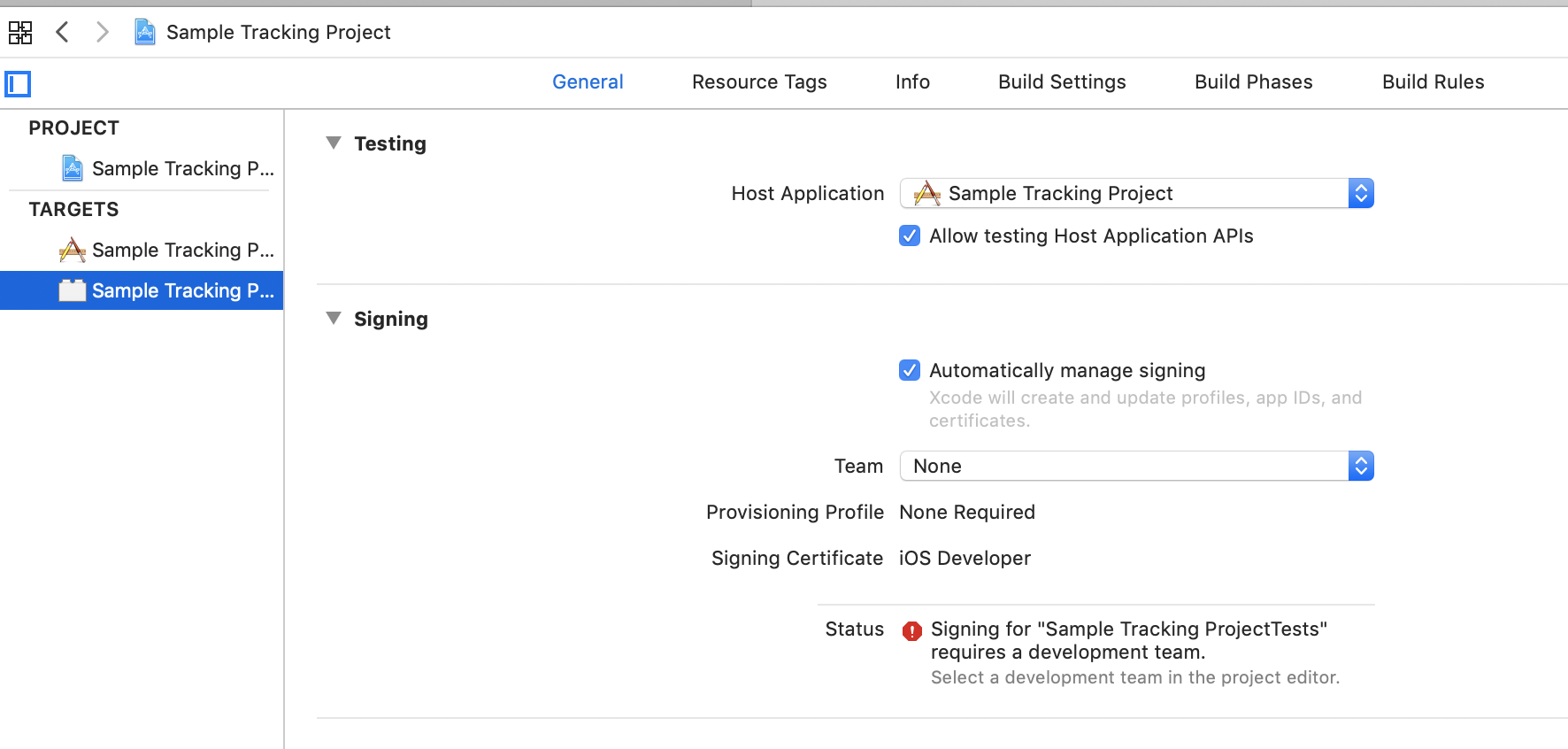
select Test Target.
Guides/Migrating.md
Outdated
| #### 9. In example project, add the newly added destination by setting its relative path. | ||
| #### 9. For tests to compile successfully from command line, code signing for the test targets must be set. (It's enough that it's a personal team, Apple ID does not need to have purchased developer program) | ||
|
|
||
| #### 10. It may happen that the pod install has created extra schemes in workspace, simply delete them, but (choose Remove reference) upon delete confirmation. |
There was a problem hiding this comment.
Can you provide more detail for users unrelated to Xcode projects where they are supposed to be findnig/deleting these extra schems in the workspace. I think if we can make these steps as explicit as possible the better. Ie. Steps like go here in Xcode, Produc -> Scheme -> Edit Scheme and then explicitly state which "extra schemes" the user should be removing or should deem as extra.
Guides/Migrating.md
Outdated
|
|
||
| #### 10. It may happen that the pod install has created extra schemes in workspace, simply delete them, but (choose Remove reference) upon delete confirmation. | ||
|
|
||
| #### 11. It may also happen that the test targets have not been created, in that case, select scheme -> edit scheme -> test -> + and it will automatically create a test scheme. |
There was a problem hiding this comment.
Again once they navigate to test what specifically are they hitting? For me it seems it the test scheme is already enabled so I can't see the workflow for when its not automatically enabled. But can we be as specific as to say be on the Info tab and hit +. Then choose the test target to add to this scheme based off the integration which you just migrated. Again the more explicit here the better.
Guides/Migrating.md
Outdated
|
|
||
| #### 11. It may also happen that the test targets have not been created, in that case, select scheme -> edit scheme -> test -> + and it will automatically create a test scheme. | ||
|
|
||
| #### 12. It may also happen that after pod install, all pods are added as targets, in that case, simply select "Manage Schemes" and uncheck all the unrequited targets. (Extra step that will not affect any of the project functionality) |
There was a problem hiding this comment.
I'm not entirely sure what you mean by the unerquited targets? Here is what my manage schemes looks like for this PR. Can you specify?
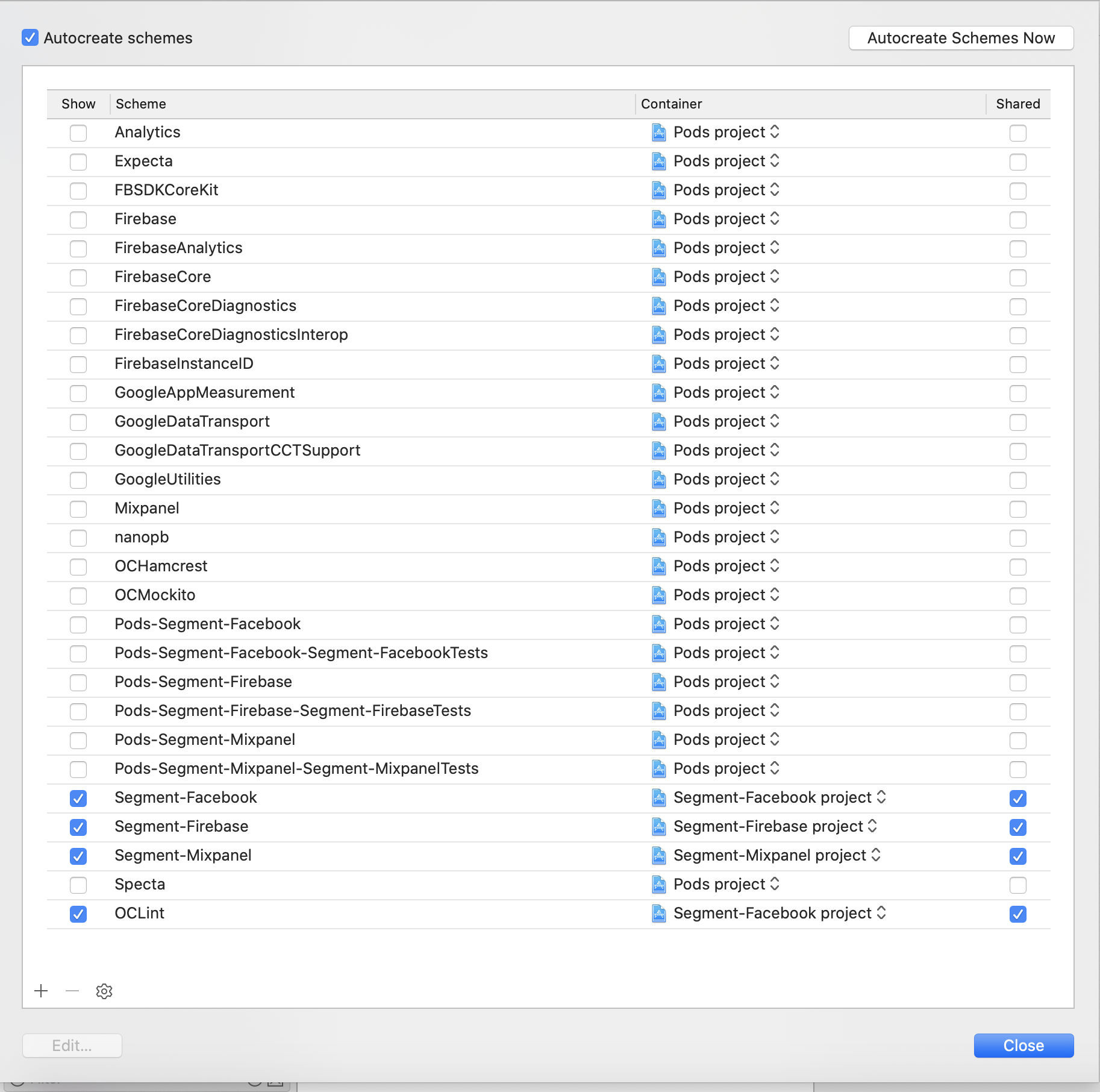
There was a problem hiding this comment.
Here because I fixed it. But sometimes, you will see e.g "Analytics", "Expecta", are selected, which is not necessary.
We just need the 3 targets we use only.
OCLint is an aggregated target, to show OCLint errors in Xcode rather than command line.
I'll add more info on that.
| #### 5. `git push && git push --tags`. | ||
| #### 6. `pod trunk push xxxx`, where xxxx is the newley added integration podspec. | ||
| ##### 1. Update the path of `Source` in the pod spec to point to master branch and change version for next release version. | ||
| ##### 2. Run ./lint.sh and .test.ch to make sure no errors detected and all tests pass. |
There was a problem hiding this comment.
The ./lint.sh command is properly building the project now, the previous PR was not, however the actual linter is printing a ton of errors to the terminal without specific detail.
It looks like a hundred lines of this:
16 errors generated.
16 errors generated.
20 errors generated.
21 errors generated.
16 errors generated.
20 errors generated.
21 errors generated.
Then the actual linter outputs this with no meaningful error log for the error:
Linting pod spec

 -> Segment-Facebook-App-Events (1.0.4)
    - WARN  | source: Git sources should specify a tag.
    - WARN  | [iOS] license: Unable to find a license file
    - ERROR | [iOS] xcodebuild: Returned an unsuccessful exit code. You can use `--verbose` for more information.
    - NOTE  | xcodebuild:  note: Using new build system
    - NOTE  | [iOS] xcodebuild:  note: Planning build
    - NOTE  | [iOS] xcodebuild:  note: Constructing build description
    - NOTE  | [iOS] xcodebuild:  warning: Capabilities for Signing & Capabilities may not function correctly because its entitlements use a placeholder team ID. To resolve this, select a development team in the App editor. (in target 'App' from project 'App')
    - NOTE  | [iOS] xcodebuild:  warning: Skipping code signing because the target does not have an Info.plist file and one is not being generated automatically. (in target 'App' from project 'App')
    - NOTE  | [iOS] xcodebuild:  clang: error: linker command failed with exit code 1 (use -v to see invocation)
    - NOTE  | [iOS] xcodebuild:  warning: The iOS Simulator deployment target 'IPHONEOS_DEPLOYMENT_TARGET' is set to 7.0, but the range of supported deployment target versions is 8.0 to 13.2.99. (in target 'Analytics' from project 'Pods')

[!] Segment-Facebook-App-Events did not pass validation, due to 1 error.
You can use the `--no-clean` option to inspect any issue.
| We use xcode build tools to run tests. You can run all the tests using: | ||
| ```bash | ||
| $ ./test | ||
| ``` |
There was a problem hiding this comment.
This still doesn't seem to be working for me:
❌  error: Signing for "Segment-FacebookTests" requires a development team. Select a development team in the Signing & Capabilities editor. (in target 'Segment-FacebookTests' from project 'Segment-Facebook')


Testing failed:
	Signing for "Segment-FacebookTests" requires a development team. Select a development team in the Signing & Capabilities editor.
	Testing cancelled because the build failed.

** TEST FAILED **


❌  error: Signing for "Segment-MixpanelTests" requires a development team. Select a development team in the Signing & Capabilities editor. (in target 'Segment-MixpanelTests' from project 'Segment-Mixpanel')


Testing failed:
	Signing for "Segment-MixpanelTests" requires a development team. Select a development team in the Signing & Capabilities editor.
	Testing cancelled because the build failed.

** TEST FAILED **


❌  error: Signing for "Segment-FirebaseTests" requires a development team. Select a development team in the Signing & Capabilities editor. (in target 'Segment-FirebaseTests' from project 'Segment-Firebase')


Testing failed:
	Signing for "Segment-FirebaseTests" requires a development team. Select a development team in the Signing & Capabilities editor.
	Testing cancelled because the build failed.

** TEST FAILED **

| ``` | ||
| For the purposes of the guide, we will assume, you are inside the Scripts directory. | ||
|
|
||
| 1- Please run check.sh to make sure all required dependencies have been installed on machine |
There was a problem hiding this comment.
@briemcnally I added in Usage how to run within Scripts directory or in root of project.
…ngelog for each of the repos
Also update pods
…tory paths of destinations

|
@briemcnally I have updated the lint script. I think now everything should work correctly. It was because I was including files that should not be linted. Do kindly test the scripts and hopefully everything works well. To run lint please do the following Note: Please add team for the test script to work correctly. Thanks |
2 participants


What does this PR do?
-Add script to install any missing/required tools and dependencies
-Add gem files to maintain same environment for all developers
-Clean project
-Run pod install/update
-Test project
-Run OCLint checks
-Add clang-format to format objective c code.
To Use
Please run check.sh to make sure all dependencies are installed either within the scripts directory or from parent directory using
./start.sh sh check.shThen run
./start.sh sh update.shto install and update pods.Then run
./start.sh sh test.shto make sure all tests have passedThen run
./start.sh sh lint.sh xxxxto lint, and to clean before building and linting.xxxx is target name.
./start.sh sh lint.sh Segment-Firebaseand to format, run
./start.sh sh format.shAssociated JIRA Tickets:
https://segmentcontractors.atlassian.net/browse/DAND-47